
Display a Bestseller badge on Shopify products page with a simple Liquid snippet. Compatible with Horizon and Dawn themes. Fully customizable, no app required.

Table of Contents⏱️ 1 min read
1.Add custom liquid
1. Go to Online Store – Themes – Edit theme.
2. Open Product page template
3. Add custom liquid and insert code.
{% if product.tags contains 'Bestseller' %}
  <span class="product-badge bestseller-badge">Bestseller</span>
{% endif %}
<style>
.product-badge.bestseller-badge {
  background-color: #FF5722;
  color: #ffffff;
  font-weight: 600;
  font-size: 12px;
  padding: 2px 8px;
  border-radius: 4px;
  text-transform: uppercase;
  display: inline-block;
  margin-bottom: 6px;
}</style>
2. Change background color (optional)
You can also change the background color in the CSS section to match your store’s branding.
background-color: #FF5722;
3. Add tag to your product
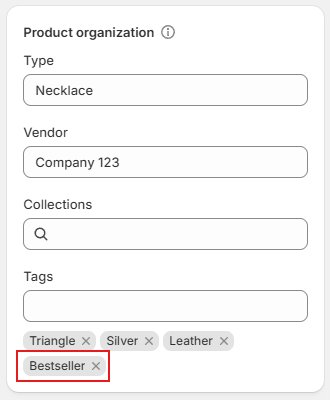
Open product where you want to add Bestseller badge. Add Bestseller tag (case-sensitive) and Save.

 I’m Fruzsina professional webdesigner/dev with years of experience.